数组队列
数组队列
背景
-
数据结构——数组队列
-
博主以b站尚硅谷Java数据结构与算法课进行学习
概念
- 队列是一个有序列表,可以用数组或链表实现。
- 遵循先入先出原则:
- 先存入的数据,先取出,后存入的数据后取出。
问题
- 使用数组模拟队列实现
- 相关数据:
- maxSize:该队列的最大容量
- front:头指针,指向队列头部,指向队列头的前一个位置,随数据的输出而改变,初始值为-1
- rear: 尾指针,指向队列尾部,指向队列尾,随数据的输入而改变,初始值为-1
步骤
-
创建 ArrayQueue类
-
代码实现:
1
2
3
4
5
6
7
8
9
10
11
12
class ArrayQueue{
private int maxSize;//表示数组的最大容量
private int front;//队列头
private int rear;//队列尾
private int[] arr;//存储队列的数组
}
public ArrayQueue(int arrMaxSize){
maxSize = arrMaxSize;
arr = new int[maxSize];
front = -1;//指向队列头部,指向队列头的前一个位置
rear = -1;// 指向队列尾部,指向队列尾
}
-
-
addQueue方法:将数据存入队列中
-
思路分析:
-
rear == front 时队列为空
-
将尾指针往后移:rear+1
-
rear == maxSize-1时 队列满不能再添加数据
-
代码实现:
1
2
3
4
5
6
7
8
public void addQueue(int n){
//判断队列是否满
if(isFull()){
System.out.println("队列满了,不能再添加数据");
return;
}
arr[++rear] = n;//先对rear+1,再进行赋值
}
-
-
-
isFull方法: 判断队列是否满
-
代码实现:
1
2
3
public boolean isFull(){
return rear == maxSize-1;
}
-
-
isEmpty方法: 判断队列是否空
-
代码实现:
1
2
3
public boolean isEmpty(){
return rear == front;
}
-
-
getQueue方法:获取队列,出队列
-
代码实现:
1
2
3
4
5
6
7
8
9
public int getQueue(){
//判断队列是否为空
if(isEmpty()){
//抛出异常
throw new RuntimeException("队列空,不能取数据");
}
front++;//后移
return arr[front];
}
-
-
showQueue方法:显示队列所有数据
-
代码实现:
1
2
3
4
5
6
7
8
public void showQueue(){
if (isEmpty()){
System.out.println("队列空没有数据");
}
for (int i = 0;i< arr.length;i++) {
System.out.printf("arr[%d]=%d\n",i,arr[i]);
}
}
-
-
headQueue方法: 显示队列头数据
-
代码实现:
1
2
3
4
5
6
public int headQueue(){
if (isEmpty()) {
throw new RuntimeException("队列空没有数据");
}
return arr[front+1];
}
-
-
主类ArrayQueueDemo方法: 测试
-
代码实现:
1
2
3
4
5
6
7
8
9
10
11
12
13
14
15
16
17
18
19
20
21
22
23
24
25
26
27
28
29
30
31
32
33
34
35
36
37
38
39
40
41
42
43
44
45
46
public class ArrayQueueDemo {
public static void main(String[] args) {
ArrayQueue arrayQueue = new ArrayQueue(3);
char key = ' ';
Scanner scanner = new Scanner(System.in);
boolean loop = true;
while(loop){
System.out.println("s(show):");
System.out.println("e(exit):");
System.out.println("a(add):");
System.out.println("g(get):");
System.out.println("h(head):");
key =scanner.next().charAt(0);//接收一个字符
switch(key){
case's':
arrayQueue.showQueue();
break;
case'a':
System.out.print("请输入一个数:");
int value = scanner.nextInt();
arrayQueue.addQueue(value);
break;
case'g':
try{
int res = arrayQueue.getQueue();
System.out.printf("取出的数据是%d\n",res);
}catch(Exception e){
System.out.println(e.getMessage());
}
break;
case'h':
try{
int res = arrayQueue.headQueue();
System.out.printf("队列头的数据是%d\n",res);
}catch(Exception e){
System.out.println(e.getMessage());
}
break;
case'e':
scanner.close();
loop = false;
break;
}
}
System.out.println("退出");
}
-
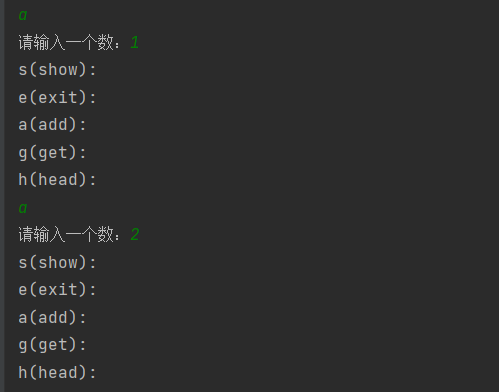
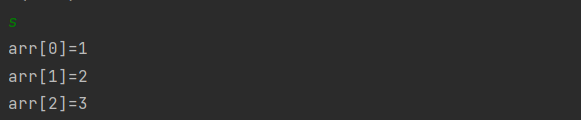
运行结果图
-
addQueue方法:
-
showQueue方法:
-
headQueue方法:

-
getQueue方法:

-
exit方法:
